Posted in Advanced Photo Assignments

Monday 8/23-Tuesday 8/24: Reviewing Camera Settings

Today’s Agenda:

We will review and get re-acquainted with camera settings using the Canon website and resources below.


http://canonoutsideofauto.ca/learn/

Answer the following questions on a Word document using the “learn” section of the website (link above):

  1. What is exposure?
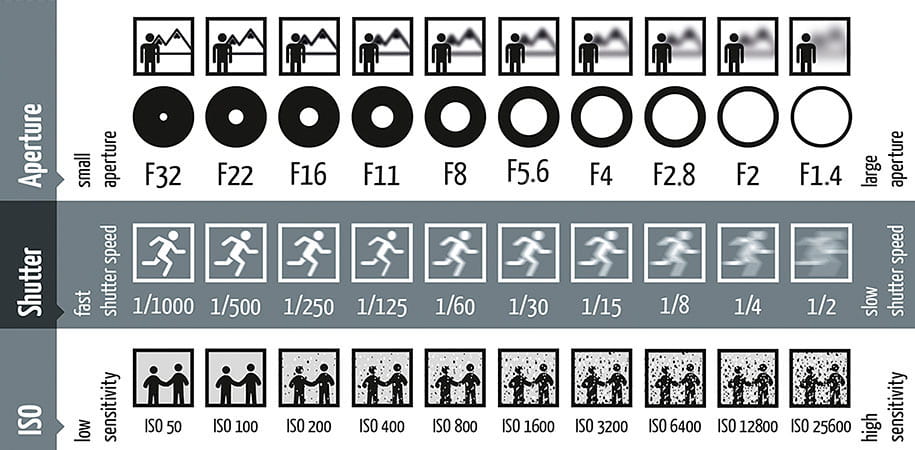
  2. What three settings affect the exposure of a photograph?
  3. What is aperture?
  4. How does f-stops relate to aperture?
  5. How does aperture relate to exposure?
  6. How do you create a shallow depth of field (blurred background)?
  7. What is shutter speed?
  8. How does shutter speed relate to exposure?
  9. How do you freeze action?
  10. What is ISO?
  11. How does ISO affect exposure?
  12. Why is it suggested to use the lowest ISO possible?
  13. What is the exposure meter?
  14. How does it let you know your photo will be well-exposed?


The use this link to experiment taking photos using the Manual Mode option which requires that you set all 3 settings yourself:

http://canonoutsideofauto.ca/play/

Once you get a good handle on creating the effects and exposure you want, try the photo challenge:

http://canonoutsideofauto.ca/challenge/


Depth of Field and Shutter Speed Info:
Depth of Field PPT

Shutter Speed PDF

Posted in Photo 1 Assignments

Monday 8/23-Tuesday 8/24: Creating, customizing, and posting to your own photo blog!

Today’s Agenda:

You will be creating your own photo blog website today!

After customizing your website, you will publish you first post featuring your best 3-6 scavenger hunt photos in a gallery view.  Caption each photo with their description (curvy line, something green, serious portrait, etc.).  Tutorials for each step are linked below…

If you want to see some past students’ blogs scroll to the bottom of this post.  You may need a password to view their website and that password is “photo”.


Step 1-Signing up with Edublogs.org: Click on the PowerPoint link below to follow the instructions.  Pay special attention to the part where you use YOUR class period number!! Follow all instructions so you don’t mess up!

Creating Photo Blog w Edublogs_Part1

Some recommended themes for your blog (these are just a few):

  • Blaskan
  • Affinity
  • Adelle
  • Aldehyde
  • Capoverso
  • Cherish
  • Twenty-Fifteen

Step 2-Customizing: Watch the video to see how to personalize your website.


Step 3-Publishing your first post: Remember to use the gallery mode instead of image.  And remember to change the “Link To” option to “Media File”.

Post your best 3-6 scavenger hunt photos with captions. Title the post, “My Best Scavenger Hunt Photos”.


Past Student Blogs: (password to view: photo)

https://6jaclynv.edublogs.org/

https://4eileeng.edublogs.org/

https://1valentinam.edublogs.org/

https://4davidt.edublogs.org/